Today are require cctv camra for security ,and Now are IP Camera avail in Market,


What is IP CAMRA
IP based cameras are the
future. They work by turning images and audio into data then transmitting this
data over a network or Internet connection. The ultimate benefit of this over
analogue CCTV systems is greater flexibility, better performance and easier
installation.
Whilst IP CCTV has been available for around 10 years, it is only in the last few years that the technology has matured, leading to the developments in Megapixel IP. Read below for a summary on the benefits of using IP based systems over traditional analogue systems.
Whilst IP CCTV has been available for around 10 years, it is only in the last few years that the technology has matured, leading to the developments in Megapixel IP. Read below for a summary on the benefits of using IP based systems over traditional analogue systems.
How IP Cameras work
·
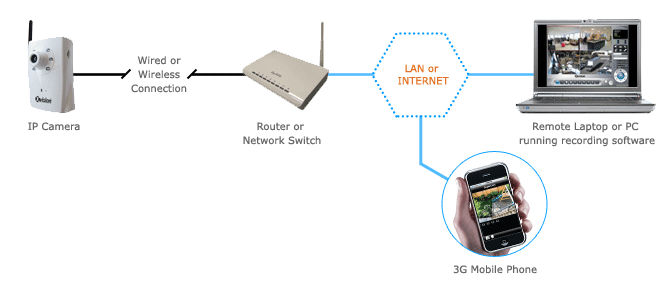
The camera turns video & audio into data
·
The camera connects to your Network or direct your Router and
transmits this data onto the network
·
This data can then be viewed as high quality images, and audio
on any authorised PC, Mac or Mobile Phone; on the local network, or over the
internet
·
The Recording Software supplied can be used to record and view
up 64 cameras on any compatible Windows PC or Laptop
1
·
Each camera turns video & audio into data
·
The camera connects to your Network via a Network Switch and
transmit their data onto the network
·
This data can then be viewed as high quality images, and audio
on any authorised PC, Mac or Mobile Phone; on the local network, or over the
internet
·
The Recording Software supplied can be used to record and view
up 64 cameras on any compatible Windows PC or Laptop
2
·
In the example below each site has 2 IP cameras
·
At site 1 the cameras are connected to the local network and
recorded on a Laptop running the Xvision Recording Software
·
The cameras are also connected to the Internet via the router
·
At site 2 the cameras are connected to the Internet, no local
recording or viewing is taking place
·
At Head Office the cameras are being recorded and viewed live on
a Laptop running the Xvision Recording Software
·
The cameras can also be viewed from an iPhone (over 3G) by the
Managing Director when he is out of the office
3
Comments