HOW TO TRACING AN EMAIL
In the following steps you'll learn how to find and copy an email header and paste it into the Trace Email Analyzer to get the sender's IP address and track the source.
Would you like to track down (or trace) where an email that you received came from?
This Trace Email tool can help you do precisely that. It works by examining the header that is a part of the emails you receive to find the IP address. If you read the IP Lookup page, you'll get a clear idea of what information an IP address can reveal.
(A header is the unseen part of every sent and received email. To learn a little bit more on headers, click here. You can see an example of a header at the end of this article.)
What email provider do you use?
To find the IP address of a received email you're curious about, open the email and look for the header details. How you find that email's header depends on the email program you use. Do you use Gmail or Yahoo? Hotmail or Outlook?
For example, if you're a Gmail user, here are the steps you'd take:
1. Open the message you want to view
2. Click the down arrow next to the "Reply" link
3. Select "Show Original" to open a new window with the full headers
Note: We are in the process of compiling instructions from a variety of popular webmail services and email applications. In the meantime, if you have a question about your email provider, please post it in the Email Tracing Forum.
STEPS TO TRACING AN EMAIL:
1. Get instructions for locating a header for your email provider here
2. Open the email you want to trace and find its header
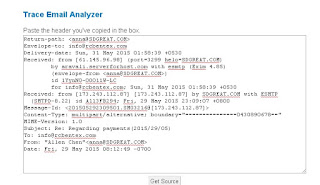
3. Copy the header, then paste it into the Trace Email Analyzer below
4. Press the "Get Source" button
5. Scroll down below the box for the Trace Email results!
You should know that in some instances people send emails with false or "forged" headers, which are common in spam and unwanted or even malicious e-mail. Our Trace Email tool does not and cannot detect forged e-mail. That's why that person forged the header to begin with!

 Whois:
The IP address 173.243.0.0 appears to have been assigned by the American Registry for Internet Numbers (ARIN). ARIN is the Regional Internet Registry (RIR) for the United States, Canada, and several islands in the Caribbean Sea and North Atlantic Ocean.
Whois:
The IP address 173.243.0.0 appears to have been assigned by the American Registry for Internet Numbers (ARIN). ARIN is the Regional Internet Registry (RIR) for the United States, Canada, and several islands in the Caribbean Sea and North Atlantic Ocean.


 Whois:
The IP address 173.243.0.0 appears to have been assigned by the American Registry for Internet Numbers (ARIN). ARIN is the Regional Internet Registry (RIR) for the United States, Canada, and several islands in the Caribbean Sea and North Atlantic Ocean.
Whois:
The IP address 173.243.0.0 appears to have been assigned by the American Registry for Internet Numbers (ARIN). ARIN is the Regional Internet Registry (RIR) for the United States, Canada, and several islands in the Caribbean Sea and North Atlantic Ocean.
Comments