
Create Bootable USB Pen Drive

Dvd,cd,are not use long time and difficult to carry cds .so why not make usb Boot able Pan drive. and  work to easy.all Hardwre Engineer.Show how to make Pan driver bootable ,
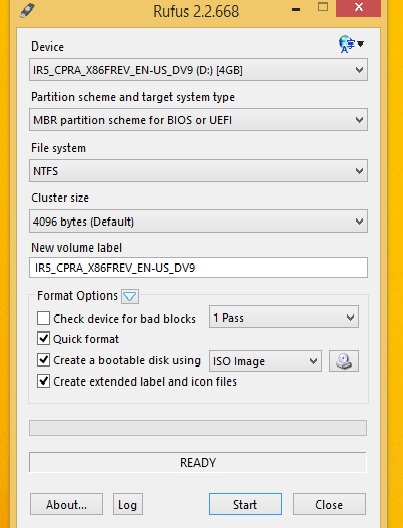


Once you have the file, you'll need to burn it to a DVD disk or a bootable USB stick. The USB option is often easier, and it means you can carry the stick drive in your pocket if you need to update the PCs of friends and colleagues.
To turn a .ISO file into a bootable USB device, you can use the official Microsoft media creation tool mentioned on the above-linked page. However, a freeware program called Rufus is actually easier and faster. Plus, it lets you format the USB drive in GPT format, which may be useful if your PC's hard disk is also in the same format.


You'll find Rufus at https://rufus.akeo.ie/ and the download is only around 1 MB. It's portable so there's nothing to install, and the program is malware-free according to VirusTotal and Web of Trust.
For formatting USB sticks, and especially for creating a bootable USB pen drive from a .ISO file, Rufus is definitely a useful addition to your PC toolkit.
and Your pan-drive Bootable and go bois setting.Select Pan Drive Frist Boot device .


Comments

Popular posts from this blog

OSI MODEL (Open Systems Interconnection model )

To Day I Explain OSI MODEL,   Open Systems Interconnection model  ( OSI ) is a conceptual model that characterizes and standardizes the internal functions of a communication system by partitioning it into  abstraction  layers. The model is a product of the Open Systems Interconnection project at the International Organization for Standardization (ISO), maintained by the identification ISO/IEC 7498-1. The model groups communication functions into seven logical layers. A layer serves the layer above it and is served by the layer below it. For example, a layer that provides error-free communications across a network provides the path needed by applications above it, while it calls the next lower layer to send and receive packets that make up the contents of that path. Two instances at one layer are connected by a horizontal connection on that layer.  The Below Shown Diagram is helpful to understand the OSI seven Layer Model. OSI MODEL EXPLANATION Th...

Mobile Device Review Framework

  Performance benchmarks that matter most Real-world performance testing goes far beyond just looking at processor speeds and RAM numbers. When conducting mobile phone reviews, focus on benchmarks that reflect how users actually interact with their devices daily. Start with multitasking scenarios - open 10-15 apps simultaneously and switch between them rapidly. Time how long each app takes to reload from memory. Premium smartphones should keep multiple apps active without constant refreshing, while budget devices might struggle after 5-6 apps. Gaming performance reveals thermal management capabilities. Run graphically intensive games for 30-minute sessions while monitoring frame rates and device temperature. Note any throttling that occurs - many devices start strong but slow down significantly as they heat up. Storage speed impacts everything from app launches to photo processing. Use tools like AndroBench or 3DMark to measure sequential read/write speeds. Modern flagship phones s...

Networking Colour Code Scheme

I Post Network Colour Code Here and Some image add in In the 21st Century Everyone Use INTERNET and they face networking problem with the chosse wrong network cable. Many Company, Engineers, Mostly Cyber Cafe and Shops of Photocopy. Here you get the solution how to choose correct wire for network. Network Cable : Colour Code : For connecting Category 3 and Category 5 wire to connectors. Both are appropriate for high speed data, though 568B is somewhat more common for installed wiring and 568A is more common in jumpers. There is no performance advantage either way. The only real difference between the two is the order in which the pairs are used (orange and green). a cable as if to plug it into a wall jack, the locking tab down (contacts facing you). The contacts are numbered 1-8 from left to right. Here's what you will see: Colour Code for 568b: (Male Connector) 1. Orange white/orange 2. Green white 3. Blue/ Blue white 4. Green 5. Brown White/Brown ...